Payouts
See your completed payouts, print a receipt, download the transactions, and choose where payout emails go.
A payout is the money a place has taken over a period, transferred to your bank account. The Payouts page lists every payout that has landed, and for each one you can open a printable receipt or download the orders behind it as a spreadsheet — everything your bookkeeping needs.
Payouts are for owners and admins. Members with the sales role cannot open this page.
Only completed payouts appear here
This page shows payouts that have already been paid — each row carries a green Complete status pill. Payouts that are still being processed do not appear in the list. When a payout completes, Citizen Pay emails the receipt and report to the address set in Payout email notifications, the card at the top of the page.
Where payout emails go
Payout email notifications is the first thing on the page, sitting between the title and the table — and it is there in the empty state too, so you can set it before your first payout ever arrives. It decides where payout receipts and reports are emailed, and says so under the field: Receipts and reports for each completed payout are emailed to this address. Leave it empty and save to turn email notifications off.
To set or change it:
- Type the address in the email field, for example
finance@yourcompany.com. - Press Save. The button only becomes active once you have changed something. On success the card confirms: Receipts and reports will be emailed to this address.
Enter something that is not a valid address and you get Enter a valid email address. If the save itself fails, the card says Couldn't save — try again. And if the card cannot read the current address when the page loads, it shows the error in place of the field instead; reload and try again.
To turn the emails off, clear the field and press Save. The card then confirms Email notifications are turned off.
Any owner or admin can see and change this. It is separate from your personal notification preferences — usually it is a shared finance mailbox.
Your payouts
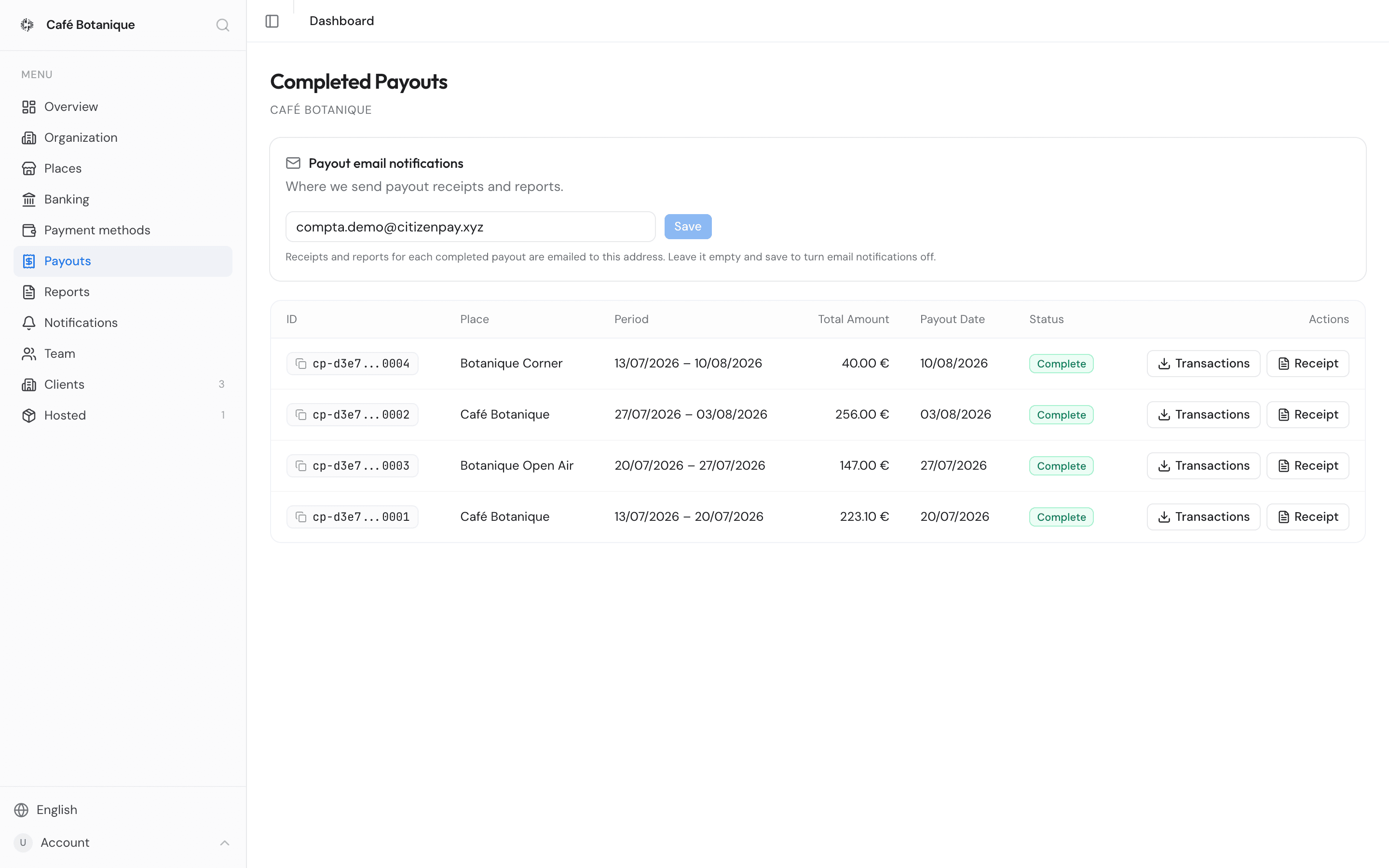
The table below the email card is titled Completed Payouts, with your commercial name underneath. Most recently updated payouts come first, one row each:
| Column | What it shows |
|---|---|
| ID | A short reference chip (e.g. cp-1a2b...9f0e). Click it to copy the full payout ID — a green check confirms it. Hover the chip to read the full ID without copying. |
| Place | The place the payout covers. |
| Period | The start and end dates the payout covers (DD/MM/YYYY). |
| Total Amount | The payout total in euros. |
| Payout Date | When the payout was completed — the row's last-updated date. It is also what the list is sorted by. |
| Status | A status pill — in practice always the green Complete. |
| Actions | Two buttons: Transactions (spreadsheet export) and Receipt (printable receipt). |
No payouts yet? The page says No completed payouts yet. If the list will not load, you get Failed to load payouts.
If your places accept a token issued by another business, your sales in that token — including those it takes for you on its own terminals — may be paid out by the issuer itself rather than by Citizen Pay. Nothing changes for you: the transfer reaches the IBAN on your Organization page, you get the same email with the receipt, the payout appears in this list once it is complete, and the receipt carries a Treasury Partner block (see the receipt). What you receive is net of the card commission and of the token's fee. If no IBAN is on file, that business cannot pay you until an owner adds one on your Organization page.
Print a payout receipt
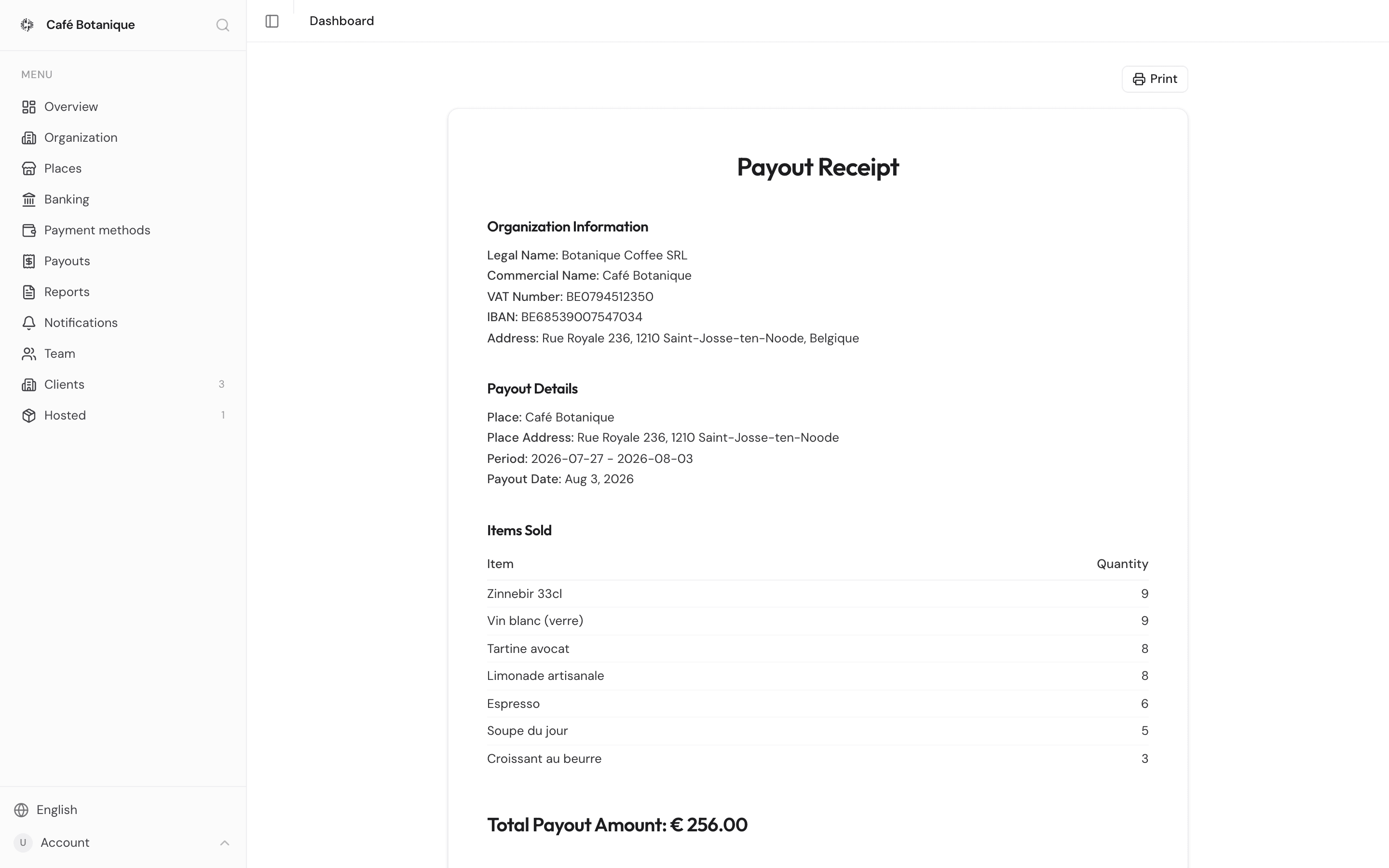
Every payout comes with an invoice-style receipt you can print or keep as a PDF.
- Find the payout and press Receipt. It opens in a new browser tab, at
/{businessId}/payouts/{payoutId}/receipt— an ordinary address you can bookmark or send to your accountant, who will need dashboard access to the same organization to open it. - Press Print at the top right to open your browser's print dialog. Only the receipt is printed — the sidebar and header are left out. From the same dialog you can save it as a PDF.
On the receipt you get:
- Organization Information — your legal name, commercial name, VAT number, IBAN and address.
- Payout Details — the place, its address, the period covered and the payout date.
- Items Sold — what was sold during the period and how much of it, biggest quantity first. Refunds and corrections are netted out, and anything that nets to zero or below is left off entirely, so the quantities show what actually sold. Nothing to show and the section is skipped.
- Total Payout Amount — the payout total in euros.
If the payout was settled in a token — a community currency or a token issued by another business —
the receipt also carries a Treasury Partner block with the company details of the business that
issued the token, and a Payment Reference (cp- followed by the payout ID) matching the bank
transfer. Payouts settled directly in EUR get a shorter
receipt without those sections.
The footer says when the receipt was generated — that is the moment you opened it, not the payout date. Reopen the receipt tomorrow and that line reads tomorrow.
Download the transactions
Want to see every order inside a payout? Download it as a spreadsheet.
- Find the payout and press Transactions. The button spins while the file is put together, then your browser downloads a CSV file.
- Open it in Excel, Google Sheets, Numbers or whatever you use.
You get one row per order, newest first, with these columns:
| Column | What it shows |
|---|---|
| Reference | The order reference (cp-order- followed by the order ID). |
| Date | Date and time of the order (DD/MM/YYYY, HH:mm). |
| Payment Method | What the order was paid in: € for euro payments, or the community currency's own symbol. |
| Total | The order total. |
| Fees | Fees deducted from the order. |
| Net | Total minus fees. |
| Status | The order's status. |
| Items | The items ordered, e.g. Coffee x 2, Croissant x 1. |
| Description | The order description, if any. |
The filename is your organization, the place and the period joined with hyphens — for example
my-business-my-place-2026-01-01-2026-01-31.csv — so exports for different places and periods are
easy to tell apart. Any part that is missing is simply left out, so a shorter name is nothing to
worry about.
- Issued by Citizen Pay
- docs.citizenpay.eu
- Title
- Payouts
- Lang
- EN
- Sheet
- 027 / 035